limedownload.com
advertisement
1200x220


 ConMet QIP Plugin
TIP FREE
 Free Download
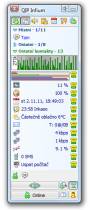
ConMet QIP Plugin is an add-on that gives you the ability to extend your contacts window with everything the Connection Meter floating window provides. Download the Plugin package and extract it to the QIP Plugins subfolder. Use the folder named "cm_QIP" for this plugin, it should mainly contain the "cm_QIP.dll" library. After restarting QIP Infium, the plugin will appear in the "Settings(QIP)/Plugins" list. In the Connection Meter, activate the forwarding in the "Settings/Content of pl.window/QIP" tab, here select "to QIP" and in the "in QIP" column select what information you want to see. If you want to have a graph of the data flow history in QIP, activate "Settings/Data flow graph/View graph in QIP". You don't need to set anything else, everything you have selected on this tab will be passed to QIP as well, each field in the Connection Meter floating window will represent one special QIP contact. Flashing is also transmitted, so you won't miss a new letter, sending an SMS, .... The contact help bubble carries more detailed information about each item.
Double clicking over a contact has the same meaning as a single click in a floating window:
Right-click over the number of e-mail messages to activate the reload of the number of messages on the mail server.
Installation:
| Product details of ConMet QIP Plugin | |
| License | free |
| Version | 2.2 |
| Producer (software list) | E+P studio |
| Product page | http://www.conmet.cz |
| Date of publication | |
| Downloads a week | 42 |
| All downloads | 1 095 |
| Rating of LimeDownload.com |  0 0 |
| VirusTotal check | Check of the day 15.07.2026, the file is 100% virus free |
| Operating system | Windows 2000/XP/2003/Vista/7/8 |
| File size | 306,24 KB |
| Installation | yes |
| Uninstallation | yes |
| Minimum configuration | Connection Meter, QIP Infium |
| download ConMet QIP Plugin | |
advertisement
300x300
| 1. | AnyDesk | 387 |
| 2. | Skype | 212 |
| 3. | TeamViewer | 184 |
| 4. | 71 | |
| 5. | Pidgin | 68 |
| 6. | Viber for Desktop | 50 |
| 7. | ConMet QIP Plugin | 42 |
| 8. | Telegram Desktop | 35 |
| 9. | RealVNC VNC Server | 29 |
| 10. | Trillian | 27 |
| 11. | Miranda IM | 24 |
| 12. | DameWare Mini Remote Control | 22 |
| 13. | Security Monitor Pro | 22 |
| 14. | LogMeIn Hamachi | 12 |
| 15. | Discord | 12 |
| 16. | TeamViewer Host | 12 |
| 17. | Monotea SMS Posílač | 12 |
| 18. | RealVNC VNC Viewer | 11 |
| 19. | Remote Desktop Manager | 10 |
| 20. | Softros LAN Messenger | 10 |
advertisement
300x600
advertisement
1290x250
